Strategist Role
This page assumes you are already whitelisted and have created a vault.
Overview
Each Orion vault is managed by a Strategist. The strategist defines the portfolio allocation by submitting an intent.
An intent is a target portfolio allocation across a set of assets. It expresses what the portfolio should look like, not how trades are executed. Execution and settlement are handled by the Orion orchestration layer.
Strategists can be implemented in two ways:
- Active Strategist: an externally owned account (EOA) submitting intents manually.
- Passive Strategist: a smart contract that computes and submits intents programmatically.
Both approaches use the same vault interface and execution pipeline.
Strategist Types
Active Strategist (EOA)
In the simplest setup, the strategist is a wallet address.
Characteristics:
- Submits intents directly to the vault (plaintext for transparent vaults; HPKE-sealed ciphertext for private vaults).
- Suitable for discretionary or semi-manual portfolio management.
- Can be automated off-chain (e.g. quant pipelines).
This approach offers flexibility but relies on off-chain logic. For how sealing works on private vaults, see Privacy & Confidential Execution.
Passive Strategist (Smart Contract)
A passive strategist is a smart contract that implements the IOrionStrategist interface.
Characteristics:
- Computes portfolio allocations on-demand.
- Encodes allocation logic directly onchain.
- Enables transparent, auditable, and trust-minimized strategies.
This model suits systematic strategies (e.g. TVL-weighted, volatility-adjusted, factor-based) and encoding index logic onchain.
What Is an Intent?
In Orion, execution always begins with an intent: a list of (asset, weight) pairs that defines the desired portfolio composition.
Key properties:
- Only whitelisted assets can be included.
- Weights are positive-definite and sum to 100%. Note that strategies can still achieve leveraged or short exposure by holding leveraged tokens, short tokens, or other derivative assets in the investment universe.
- Intents are validated onchain before being accepted.
Once submitted, an intent becomes the authoritative target state for the vault until a new intent is provided by the strategist.
Submit an intent
As an active strategist, you can submit intents from the Orion app or the Orion SDK. Both set the same onchain target allocation for the vault.
In the app
Open Manage on a vault, choose Rebalance, set the target allocation, and confirm onchain.
Open Manage
You can reach the manage flow from either place:
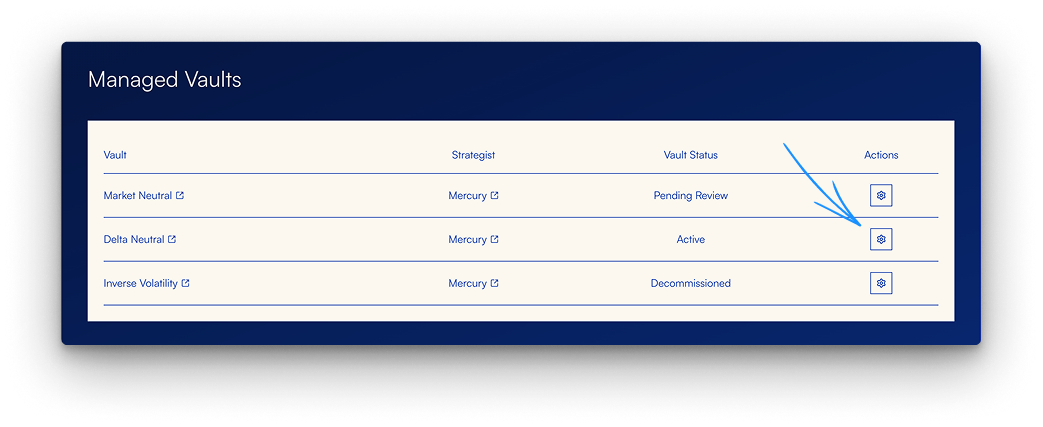
From My Portfolio - In Managed Vaults, open the gear icon under Actions for an active vault.
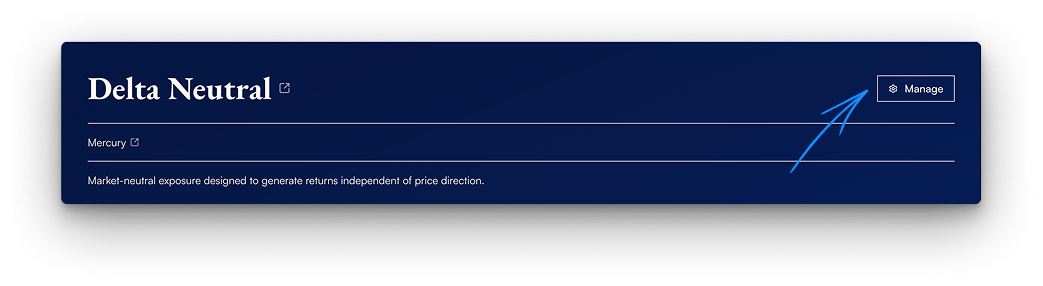
From the vault page - Open the vault and click Manage.
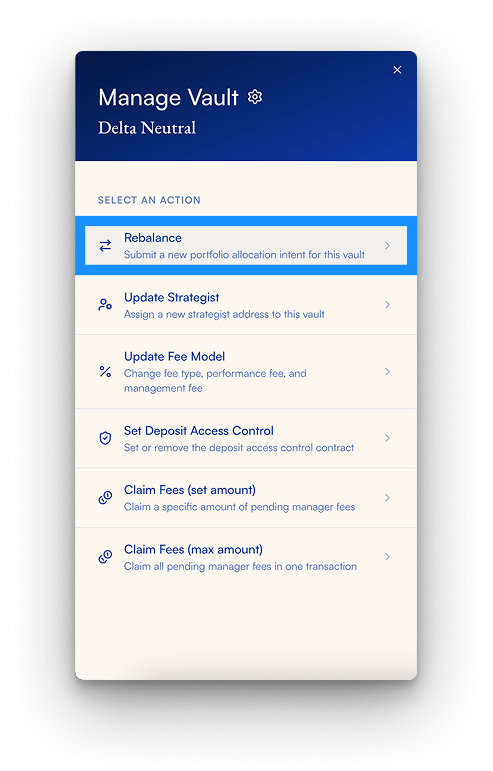
Choose Rebalance
In Manage Vault, select Rebalance to submit a new portfolio allocation intent.
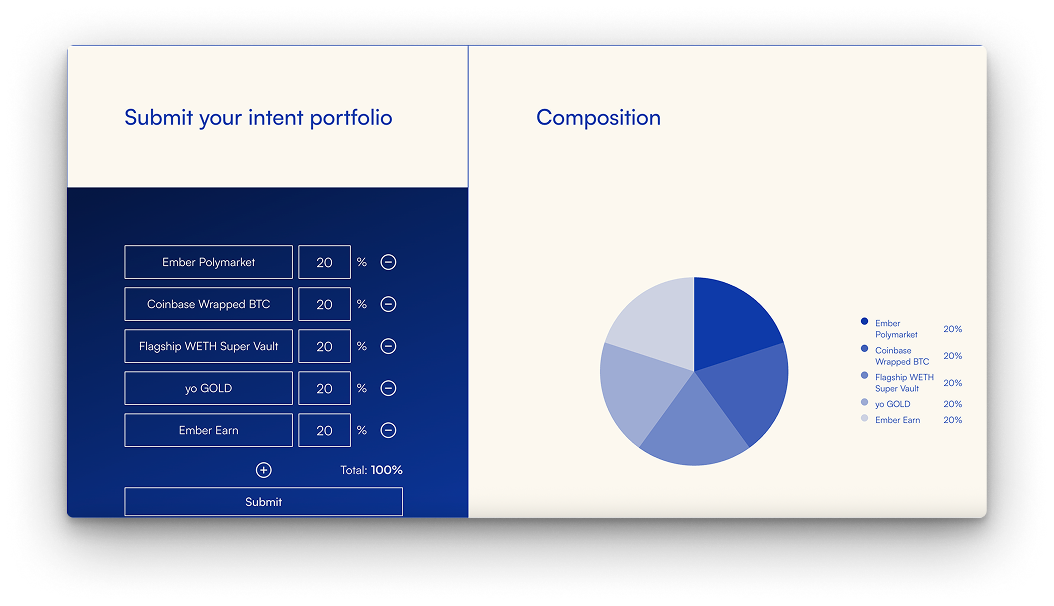
Set allocation and submit
Add assets, set weights so the total is 100%, then submit. The composition chart updates as you edit.
After the transaction confirms, you see an Intent Submitted confirmation with the vault address, transaction hash, and allocation summary.
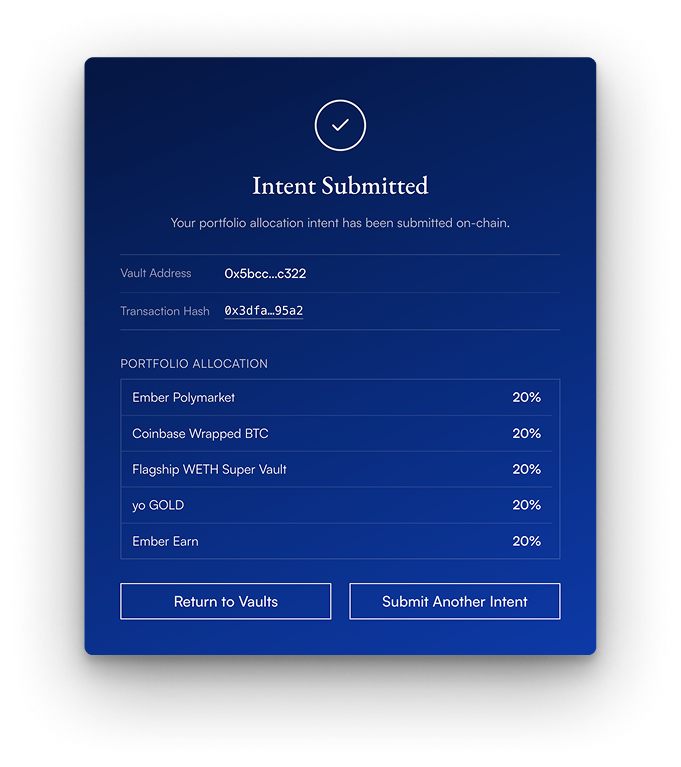
For private (encrypted) vaults, the app seals the allocation with HPKE before the onchain call. Plaintext weights are not stored onchain for those vaults; investor-facing vault pages also hide allocation charts.
With the SDK
Submit the same (asset, weight) intent programmatically via the Orion SDK. For private vaults, seal the intent with the SDK (or another HPKE-compatible client) before submitIntent. See also the SDK vault-creation demo for related setup.
The submitted intent remains the vault's target allocation until you submit a new one. For how intents become trades, see From intent to trades.